

Slow online store performance may negatively impact customers’ ability to browse products, place orders, and visit your site again. Thus, Ecommerce Site Speed is an integral part of providing users with a positive shopping experience when they demand fast-loading pages on their mobile devices.
Poor performance may be caused by too big images, additional scripts, poor optimization of the theme, third-party plugins, limitations of servers, and inefficient coding. Fortunately, most online stores can boost performance by finding the main factors that affect it and resolving them in order.
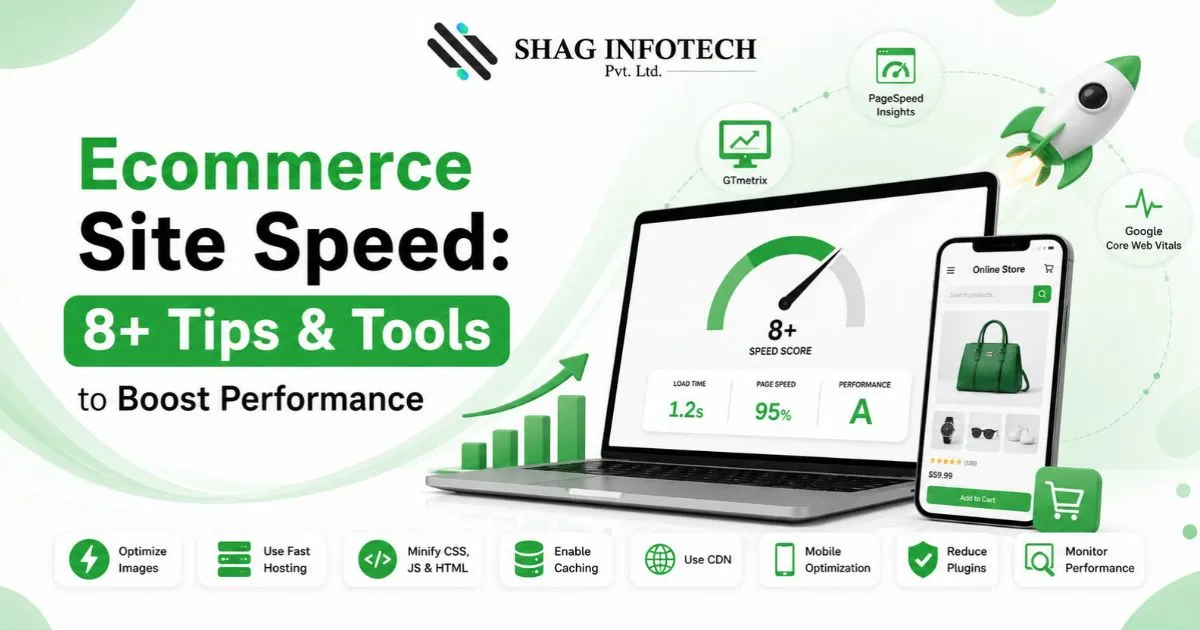
In this article, I will tell you how to increase the speed of your online store in 8 easy steps, tools to test your improvements, and errors you should avoid.
Key Takeaways
- Faster pages can create a smoother shopping experience.
- Mobile performance deserves special attention.
- Large images and unnecessary scripts are common performance issues.
- Core Web Vitals help evaluate important aspects of page experience.
- Testing tools can identify technical bottlenecks.
- Speed optimization should be measured before and after changes.
- Performance improvements should not compromise important store functionality.
Table of Contents
- Why Ecommerce Site Speed Matters
- 8+ Tips to Improve Ecommerce Site Speed
- Important Performance Metrics
- Speed Testing Tools
- Website Speed Optimization Best Practices
- Common Mistakes
- Practical Example
- FAQs
- Conclusion
Why Ecommerce Site Speed Matters
Ecommerce Page Speed influences the speed at which users will be able to view products, browse through categories, interact with the pages, and move closer to the checkout process. Performance also has to be taken into consideration together with mobile usability, technical SEO, hosting, images, JavaScript, third-party apps, and the checkout process.
Ecommerce Website Performance and User Experience
Ecommerce Website Performance is not only about getting a good score with the testing tool. It is necessary for the website to react quickly while the user uses its menus, filters, product gallery, search, cart, etc.
Even if the homepage is technically fast, the user experience may be quite bad if there are lots of scripts on the product pages that react slowly.
8+ Tips to Improve Ecommerce Site Speed
1. Optimize Product Images to Reduce Page Weight
Large images are one of the most frequent causes of unnecessary weight on ecommerce pages. Hundreds or thousands of images are found within stores, which makes optimizing images a crucial task.
Images should be compressed prior to uploading them and use newer image formats wherever possible. In addition, do not serve images with much greater resolution than the place they are served in.
For instance, there is no need to download a big image for a thumbnail of a product.
Practical checklist:
- Compress product images.
- Use appropriate dimensions.
- Consider modern formats such as WebP or AVIF.
- Use responsive image delivery.
- Avoid unnecessary duplicate images.
2. Improve Mobile Speed for Better Shopping Experiences
Online shopping websites are used by consumers on their mobile phones; hence, Mobile Page Speed tests should be done separately from the performance of desktops.
The phone may have slower internet connectivity and processing power than desktops. What may appear as a tolerable loading speed on a fast internet-connected desktop will be quite slow on a mobile phone.
Test mobile product, category pages, navigation, filters, search and checkout experience. Eliminate nonessential features that will only make mobile pages heavy.
3. Remove Unnecessary JavaScript and Third-Party Scripts
JavaScript offers various capabilities for e-commerce, but having too many JavaScript files can slow down the processing time on your pages.
Perform an audit to check all the applications, plugins, trackers, widgets, chats, pop-ups, recommendation engines, etc. Remove anything you don’t need anymore.
For Shopify and WooCommerce, periodic checking of the apps/plugins helps prevent unnecessary functionality from building up on your store.
4. Use a Content Delivery Network
The Content Delivery Network distributes the website resources across various servers. This will allow the site visitor to access the static resources from a closer server.
Content Delivery Networks will be very helpful for the ecommerce business operating in different geographical locations.
They can help deliver resources such as:
- Images
- CSS
- JavaScript
- Cached content
- Other static files
A CDN, nevertheless, does not solve the entire speed issue. Suboptimally optimized images, too much JavaScript, slow database calls, and server issues may still impact speed.
5. Improve Website Loading Speed Through Caching
Caching ensures that specific assets are stored so that they don’t have to be created or downloaded every time there’s an access request.
A good caching mechanism can save the trouble of doing things again and ensure faster responses for returning users. Caching may take place at several levels based on the platform you’re using.
Store owners must make sure that the caching mechanism works fine and doesn’t show outdated prices or other dynamic data to customers.
6. Monitor Core Web Vitals
Core Web Vitals provide useful measurements for understanding important aspects of page experience. Three metrics are particularly relevant:
Largest Contentful Paint
Largest Contentful Paint measures when the largest visible content element has rendered. It helps indicate how quickly the main content becomes available to the visitor.
Large hero images, slow servers, render-blocking resources, and inefficient page structures can affect this metric.
Interaction to Next Paint
Interaction to Next Paint evaluates how responsive a page is to user interactions. This is particularly relevant for ecommerce websites because customers frequently click buttons, open menus, use filters, select product variations, and interact with carts.
Reducing unnecessary JavaScript and improving interaction handling can help create a more responsive experience.
Cumulative Layout Shift
Cumulative Layout Shift measures unexpected movement of page content. Layout shifts can be frustrating when a customer tries to click a button or product element and the page suddenly moves.
Reserve appropriate space for images, advertisements, embedded content, and other elements that load dynamically.
7. Test Your Store With Performance Tools
Regular testing helps identify performance issues instead of relying on assumptions.
Google PageSpeed Insights is useful for evaluating page performance and identifying potential improvement areas. Test important templates rather than only the homepage.
GTmetrix provides additional performance information and waterfall-style insights that can help identify resources contributing to page load time.
Lighthouse can also help developers assess performance and other technical aspects of individual pages.
Speed Testing Tool Comparison
| Tool | Best Use |
| Google PageSpeed Insights | Performance and Core Web Vitals insights |
| GTmetrix | Detailed performance analysis |
| Lighthouse | Auditing individual pages |
| Browser DevTools | Developer-level debugging |
Testing should be performed before and after major optimization changes so you can see whether the modification actually helped.
8. Review Third-Party Apps and Plugins
Third-party tools can add valuable functionality to an online store, but every additional script or plugin can potentially affect performance.
Review your installed apps, plugins, tracking systems, pop-ups, reviews, analytics tools, social widgets, and other integrations.
Ask a simple question: Does this feature provide enough business value to justify its performance cost?
Remove unnecessary tools and investigate whether essential tools can load only on pages where they are actually needed.
Ecommerce Performance Optimization: What to Prioritize
Ecommerce Performance Optimization works best when improvements are prioritized according to their actual impact. Start with the largest problems instead of making dozens of minor changes at once.
A practical priority order is:
- Identify slow templates and pages.
- Test Core Web Vitals.
- Optimize large images.
- Reduce unnecessary scripts.
- Review third-party apps and plugins.
- Improve caching and CDN delivery.
- Investigate server response issues.
- Retest after each major change.
This approach makes it easier to determine which improvements produced measurable results.
Ecommerce SEO and Website Speed
Ecommerce SEO involves many factors, and performance is only one part of a broader technical and content strategy. However, a fast and usable store can support a better overall user experience.
When working on speed, avoid removing important content or functionality simply to achieve a better testing score. The objective should be a fast, useful, accessible store rather than a perfect laboratory score.
Businesses that need broader technical support can also consider ecommerce seo services that combine technical optimization with product, category, and search visibility strategies.
Common Website Speed Optimization Mistakes
Some optimization efforts fail because businesses focus on the wrong things. Common mistakes include:
- Optimizing only the homepage
- Ignoring mobile performance
- Uploading oversized product images
- Keeping unused plugins and apps
- Installing multiple optimization tools that overlap
- Focusing only on a single speed score
- Making changes without testing afterwards
- Removing useful functionality just to improve a metric
Good Website Speed Optimization should balance performance, usability, functionality, accessibility, and business requirements.
Practical Example: Improving an Online Store
Consider an example of a fashion website that utilizes high-quality pictures of products, marketing scripts, review modules, and many other trackers.
An analysis reveals the presence of oversized images and additional third-party scripts that are not necessarily needed on every page of the site. The company reduces image size, serves correct image sizes, removes unnecessary scripts, tunes caching, and analyzes CDN delivery.
Once the improvements are made, the team repeats its testing for critical product and category pages. It does not simply accept that the website is now fast; it makes comparisons and analyzes user performance.
Such testing is more accurate than basing optimization on the test of the home page alone.
Best Practices for Maintaining Store Performance
Speed optimization should be an ongoing process rather than a one-time project.
Monthly Performance Review
Test important pages regularly, including:
- Homepage
- Category pages
- Product pages
- Search results
- Cart
- Important landing pages
Before Installing New Apps
Ask whether the new functionality is necessary and whether it adds scripts to every page.
After Website Changes
Retest performance after theme updates, redesigns, new tracking tools, major campaigns, and platform changes.
Monitor Real Users
Laboratory tests are useful for troubleshooting, but real-user data can provide additional insight into how visitors experience your store across devices and networks.
Frequently Asked Questions
1. What is Ecommerce Site Speed?
Ecommerce Site Speed refers to how quickly an online store loads and responds when visitors browse pages and interact with features such as menus, product images, filters, carts, and forms.
2. How can I improve ecommerce website speed?
Start by optimizing images, reducing unnecessary JavaScript, reviewing third-party apps, improving caching, using a CDN, and testing important pages regularly.
3. What is a good Largest Contentful Paint result?
A commonly used Core Web Vitals threshold considers an LCP of 2.5 seconds or less to be a good result. However, businesses should evaluate the complete user experience rather than relying on one metric.
4. Why is Mobile Page Speed important for ecommerce?
Mobile shoppers may use slower connections and less powerful devices. A page that performs well on desktop may therefore provide a different experience on mobile.
5. Is Google PageSpeed Insights enough for testing?
It is a useful tool, but it should not be the only source of information. Tools such as GTmetrix, Lighthouse, browser developer tools, and real-user data can provide additional insights.
6. Does a CDN make an e-commerce website faster?
A CDN can improve delivery of cached and static resources, particularly for geographically distributed visitors. However, it cannot fix every performance problem, such as oversized images or inefficient application code.
7. Can website speed affect Ecommerce SEO?
Performance is one part of the broader technical and user-experience picture. Ecommerce businesses should combine speed improvements with strong content, crawlability, structured data, internal linking, and other SEO practices.
Conclusion
Improving Ecommerce Site Speed is not about chasing a perfect score from one testing tool. The real goal is to create an online store that loads efficiently, responds smoothly, and gives shoppers a reliable experience across devices.
Start with the biggest issues: oversized images, unnecessary scripts, third-party applications, caching, CDN delivery, and server performance. Then test important pages and monitor the results over time.
When speed improvements are combined with strong technical SEO and a user-focused ecommerce strategy, businesses can create a more efficient foundation for long-term online growth.
If you need professional help with website performance, technical SEO, and broader digital growth, Shag Infotech can help you identify performance issues and develop a practical optimization strategy for your ecommerce website.